
What is still on the drive after the patient list is deleted?
Manufacturers publish routine instructions for removing studies. GE HealthCare’s 2024 video NextGen LOGIQ e: Deleting a Patient from the Hard Drive is one example for that model. 7 Treat that kind of archive operation as housekeeping, not as proof of media sanitization. Whether deleted files can still be recovered depends on the model, software release and storage medium, and that is what the testing below examined.
GE’s 2015 user guide for the LOGIQ P9/P7 places responsibility for the stored data with the customer and recommends regular backups. 6 The archive view alone cannot show whether deleted files remain recoverable.
James Moggridge of the Medical Physics Department at University College London Hospitals tested exactly that on nine ultrasound systems due for decommissioning and published the results in Ultrasound in 2017. 1 Each hard disk was removed, connected to a PC and scanned with the open-source recovery tools TestDisk and PhotoRec, targeting the archive partition. The paper’s explanation is simple. Deleting a record removes the database entry and the file-table entry, but, as with a PC, the files themselves can be recovered.
On the scanner tested after deletion with the system’s own tools, recovery produced 48,853 DICOM-type files, 93,235 JPEGs and 27 bitmaps. That was too many files to find the single test patient stored for the experiment. 1 In the samples examined, most JPEGs had the patient’s name, date of birth, ID and clinic details legible on the image. Most recovered DICOM files were too corrupt to open as images. Their headers, which carry the patient and clinic fields, still read as plain text in Notepad.
That matters for anyone who assumes a damaged or proprietary archive offers protection. The identifiers sit inside the recovered files, so a broken database index does not hide them. The author adds that a more bespoke file format may slow recovery but not prevent it, particularly where send buffers hold ordinary DICOM or JPEG files. 1
Where patient data hides beyond the archive
Patient identifiers are not confined to the study folders. The 2017 paper warns that send queues, spoolers or buffers in other parts of the drive may remain after patients are deleted from the archive. It also warns that deleting them file by file always risks missing some. 1 ECRI’s decommissioning guidance, adapted by TechNation, adds a second category: IT data such as network settings, DICOM configurations, Active Directory accounts and wireless keys. That data can help an attacker even when no patient record remains. 10
- DICOM message and communication logs. These logs help engineers trace network transactions, and they can carry patient fields outside the archive. The clearest documented case follows below.
- Send queues and print spoolers. Studies waiting to transmit or print sit outside the archive the user clears. The paper names both. 1
- Buffers and other working folders. This is the paper’s general warning. Which folders exist, and where, depends on the model and software release. 1
- Site and network configuration. This covers the hospital name, AE titles, worklist and PACS destinations, credentials and wireless keys. ECRI lists removing these as a separate decommissioning step. 10
The Siemens Acuson Sequoia C256 thread on MedWrench shows how this plays out. 8 In March 2020 an owner preparing a system for transfer to another facility had deleted the patient data and images, yet patient information was still visible in the DICOM logs. The user manual said nothing about the logs. Several companies the owner contacted knew no way to remove them without removing the hard drive. A reply from an independent service company described a service-interface data reset for the patient archive. The owner reported that it did not remove the patient information in the DICOM message logs. A follow-up reply from the same company offered only one route to clear them: a software reload. The last post, in November 2021, suggested calling a technical helpline. No one confirmed a fix.
Two lessons follow. A service-menu reset aimed at the patient archive is not proof that every file carrying identifiers is gone. And the one route offered, a software reload, is the method the 2017 testing showed leaves files recoverable. The forum does not establish what a reload would leave recoverable on this Sequoia. Before an ownership transfer, require a validated sanitization method matched to the actual storage medium; ordinary overwriting is not sufficient for every SSD. This page does not reproduce the thread’s service keystrokes, because service-interface work belongs to qualified engineers using the manufacturer’s documentation.
Does a full software reinstall count as erasure?
In the 2017 paper, a software reload is described as the likely maintenance-provider response to a request to clear user data. 1 An empty archive and factory settings can therefore look reassuring without establishing erasure.
The study reinstalled the operating software on all nine systems, formatting every partition. Each scanner was started to confirm that it worked and showed an empty archive, and then its drive was removed. Every drive still yielded patient files. 1
View chart data
| Category | DICOM-type files | JPEG files |
|---|---|---|
| Scanner 1 | 48853 | 93235 |
| Scanner 2 | 48076 | 90835 |
| Scanner 3 | 37345 | 72488 |
| Scanner 4 | 25577 | 49689 |
| Scanner 5 | 29009 | 55992 |
| Scanner 6 | 6973 | 12364 |
| Scanner 7 | 42679 | 84269 |
| Scanner 8 | 43777 | 83938 |
| Scanner 9 | 39181 | 75390 |
Nine ultrasound systems being decommissioned, tested by a UK hospital medical physics department. Each was reinstalled with all partitions formatted, then examined with TestDisk/PhotoRec. Afterwards, Scanners 1–8 were overwritten with DBAN and Scanner 9 with a GE-supplied forensic device; neither left any recoverable files.
Source: Moggridge J. Ultrasound. 2017;25(1):16–24, Table 1 (Method 2 columns)
- Across the nine drives, recovery found 6,973 to 48,853 DICOM-type files, 12,364 to 93,235 JPEGs and 0 to 372 bitmaps per scanner. 1
- On Scanner 1, the counts after the reload matched the counts after simple archive deletion exactly: 48,853, 93,235 and 27. 1
- The recovered files showed the same kind and amount of patient-identifiable data as after archive deletion. 1
The paper’s explanation is that a reload often just reformats the disk and rebuilds the patient-data folders from a saved image. The old files therefore stay recoverable, and the partition table looks as it did before. 1 A reload installs software; it does not sanitize the drive.
Five methods, one test: what actually cleared the data
The study compared five methods. The first three roughly match the escalating effort of a clinician, a maintenance provider, and an in-house physics or equipment team. The fourth is what you get when you hire a third party or ask for a forensic wipe. The fifth tries to remove deleted data while keeping the system software. 1
| Method | Tested on | What was done | Files recovered afterwards | System afterwards | What it means at handoff |
|---|---|---|---|---|---|
| 1. Archive deletion with the scanner’s own tools | 1 scanner | Studies deleted from the archive; drive removed and examined | 48,853 DICOM-type; 93,235 JPEG; 27 bitmap | Working, archive empty | Housekeeping only. Not sanitization; an off-site repair needs an approved data-handling arrangement, and an ownership transfer needs validated sanitization. |
| 2. Full software reinstall | All 9 | Operating software reinstalled, all partitions formatted | 6,973–48,853 DICOM-type and 12,364–93,235 JPEG per scanner | Working, archive empty | Not erasure, even though the system looks new. |
| 3. Whole-drive overwrite (DBAN, DoD 3-pass) | 8 drives | Drive overwritten with pseudorandom data, then software reinstalled | 0 | Reinstalled and confirmed working | Effective on these disks. The software has to be reinstalled afterwards, which can be hard on an old system. |
| 4. Forensic wipe device | 1 drive | Falcon forensic device supplied by GE Healthcare and run by a third-party support provider; software then reinstalled | 0 | Reinstalled and confirmed working | Effective against the recovery tools on this one tested disk. Request a supported method matched to your media, with verification and validation records. |
| 5. Archive deletion, then blank-space wipe (BleachBit) | 1 scanner, small test set | 224 test images (each stored in three file formats) deleted with the scanner’s tools; drive attached to a PC and free space overwritten on each partition | Before the wipe: 516 JPEG-type and 237 DICOM-type. After: 0 | Started normally | Keeps the software, but only overwrites deleted space. Live files such as logs, queues and configuration are untouched. |
Source: Moggridge J. Ultrasound. 2017;25(1):16–24, Methods and Tables 1–2
What these counts mean. They count recovered files, not patients or unique examinations. Multiple formats can represent the same image, and many DICOM-type files were corrupt. Zero recovery means these tools found no files in this test; it is not certification of every model, drive or forensic technique. The paper does not name scanner models, so its results cannot serve as a model compatibility or erasure-utility list. 1
Two findings shape the choice between these methods.
- One overwrite pass was enough on these disks. The paper cites the view that a single pass is sufficient for hard drives made after 2001 and larger than 15 GB. In its own testing, one pass proved as effective as three or seven, and faster. It still tells readers to follow their local information-governance policy. 1 NIST’s July 2026 FAQ for SP 800-88 Rev. 2 now states that multi-pass overwriting is unnecessary and can shorten the life of flash media. 4
- Blank-space wiping is a partial method. It suits a working system whose software must survive. But it relies on every patient file having been deleted first, and the paper warns that queues, spoolers and buffers may remain. The author’s preferred variant is a hybrid: a full software reinstall to a fresh state, followed by the blank-space wipe. 1 NIST’s FAQ prefers sanitizing the whole device. For necessary partial sanitization, it describes cryptographic erase where there is confidence the target data never escaped its encrypted boundary. That does not validate this historical blank-space method for a current handoff. 4 In the study the wipe ran with the drive attached to a PC, not on the scanner. Running third-party software on a medical device is a decision for the manufacturer or your qualified service provider.
Hard disks then, often solid-state storage now. The 2017 systems used IDE hard disks, and overwrite results from those drives do not carry over to flash storage. NIST SP 800-88 Rev. 2, published in September 2025, notes that ordinary overwriting cannot reach every area of a flash device with spare cells and wear levelling. It also says multi-pass overwriting achieves very little on SSDs with over-provisioning. 3 Rev. 2 no longer lists media-specific recipes. Instead, it points to IEEE 2883 for choosing a technique, and it names overwrite, block erase and cryptographic erase, run through dedicated device sanitize commands, as purge techniques. 34 Cryptographic erase only counts if, among other conditions, no sensitive data was stored on the drive in plaintext before the keys were set up. 4 For a solid-state console, ask the manufacturer which sanitize command or utility the drive and software support before you decide.
Destination split: what to do before the equipment leaves
The best-known advice on this question is sound but generic. Delete patient data before a sale, and take care, because the operating software often shares the drive. Since there is no one-size-fits-all answer, it says, contact the vendor, your engineer or a buyer’s engineer. 9 ECRI’s guidance goes further. It says to choose the most secure practical method for the device’s destination, ranging from destroying the media down to device-provided deletion. It adds that the two weakest options, a factory reset and device deletion, make recovery “difficult, but not impossible”. 10 The 2017 paper adds the distinction that matters most. An approved arrangement may cover an off-site repair or the replacement of a storage component, but the author distinguished these from a lease return or transfer of ownership under the UK law then in force. This is historical context, not a ruling on every present-day contract. 1
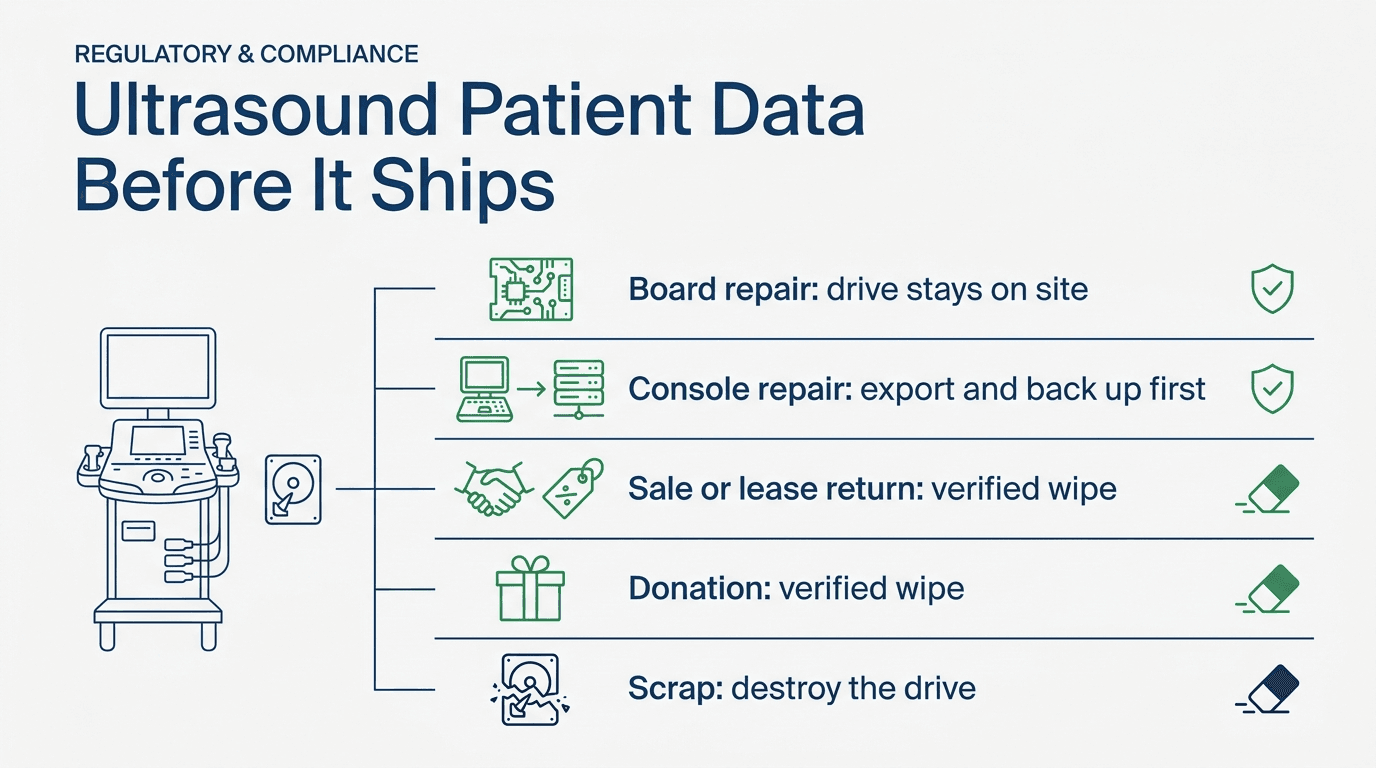
The table applies that logic to the five ways an ultrasound, or part of one, leaves a site.
| Where it is going | Export first | Keep working | Data step on the drive | Proof to keep |
|---|---|---|---|---|
| Board or probe repair (the part ships; the console stays) | No study export is needed for a confirmed storage-free part. Verify the exact assembly before shipment. | The console and its drive stay with you. | No sanitization for a part confirmed to contain no patient data. A host computer, back-end PC assembly, or any component with non-volatile memory needs a manufacturer-confirmed storage map and a data decision. Remove media only if the service procedure and repair scope permit it. | Part number, serial and photos of both sides; a work-order note that no storage left the site. |
| Whole-console repair (the system comes back to you) | Export required studies to PACS or another approved archive and verify receipt. Back up system data before hard-drive work. 6 | Software, options and configuration, because the repair needs a working system. | A repair is not an automatic exemption from data controls. Agree a model-specific plan before shipping: retain storage on site if feasible, use an approved sanitization/restoration procedure, or allow necessary data access only under privacy-approved safeguards and terms. U.S. service technicians can be business associates when their work involves PHI disclosure. 12 | Archive reconciliation, protected backup, privacy approval, access and transport controls, required service agreement, and records for any removed or replaced media. |
| Sale or lease return (ownership leaves; the system must work) | Export required studies and records to PACS or another approved archive; verify receipt and retain them under your policy. | Only what the sale or lease needs to work. The paper notes that a lease may require approved parts and a working system at return. 1 | Use a validated whole-device method matched to each medium; NIST prefers purge over clear when possible. Ordinary overwriting is an option for suitable hard disks, not a blanket SSD solution. Plan any authorized software restoration first. Alternatively, retain and replace media, then destroy originals when retention permits. Remove network, DICOM and account settings. 310 | Media inventory tied to the console serial; method, tool/version, verification and validation decision for each medium; restoration/acceptance record and third-party process checks. |
| Donation (ownership leaves; the recipient may have little support) | As for a sale. | An authorized working configuration and validated presets, with the recipient’s clinical acceptance checks. | As for a sale. Also unlink the system from any management server or cloud service. 10 | As for a sale, plus the transfer-of-title record. |
| Scrap or recycling | Confirm the records are archived under your retention policy. | Nothing. | Identify every storage medium and arrange an approved destruction method when retention permits. The paper considers physical destruction the safest usual route for its tested hard disks. Match the technique to the media and data sensitivity. | A destruction record listing each storage medium, a written contract with the recycler, and checks of its process. 11 |
Source: Moggridge 2017; GE LOGIQ P9/P7 User Guide; ECRI via TechNation; NIST SP 800-88 Rev. 2 and FAQ; HHS business-associate guidance; NHS Surrey penalty reporting
A buyer of a used system should expect this evidence. The wipe-proof and license gates a used-system buyer applies are the other side of the same handoff.
Before a repair shipment: back up and agree the data plan
Export and back up before any destructive data action. A whole-drive wipe can remove the software and configuration needed for diagnosis, and the 2017 paper warns that restoration can be difficult or unavailable. 1 That is a reason to agree the repair and restoration plan before anything ships. It is not permission to send patient data out unprotected.
For the LOGIQ P9/P7, GE recommends backing up system data before hard-drive service and warns that failure or repair can cause data loss. The same 2015 guide says the system is not meant for long-term storage of patient data or images. 6
Check the equivalent instructions for your exact model and software version. Use the following sequence as a planning checklist, with execution by the manufacturer or qualified service provider.
- Reconcile the archive with PACS. Export the studies and associated records that must be retained to PACS or another approved archive, check the send queue for failed or pending jobs, and verify receipt, completeness and readability at the destination. Do not erase the source while required records remain unreconciled. If the scanner images but will not send, see when the scanner images but will not send to PACS.
- Back up system data. Use the system’s own backup or export function for presets, measurement packages and connectivity settings. Label the backup with the console serial and store it under your data policy. Protect the backup and restrict access; it may itself contain patient information or credentials.
- Record installed options. List the enabled software options and keep the option certificate or key record. If the drive or host board fails during repair, these records decide whether the system can be restored. See diagnosing drive versus motherboard when the console will not boot.
- Ask whether the repair can be done at board level. If the fault isolates to a power supply, a beamformer or another assembly without storage, ship only the part and keep the console and drive on site. Removing a board is a job for a qualified engineer, with the system powered down and following the manufacturer’s service procedure.
- Approve handling before a console travels. Ask the manufacturer and service provider whether storage can remain on site and whether a supported sanitization and restoration procedure is required. If PHI must remain accessible for the work, obtain privacy approval for the access, transport, subcontractors and return or disposal arrangements. HHS lists device-service technicians whose work discloses PHI as potential business associates; have your privacy lead determine the required agreement. 12
- If the drive itself has failed. A failed drive may still hold patient data. Keep it under your data policy rather than sending it to an unauthorized third party, and decide on destruction once the data is no longer needed.
- Check the returned system before clinical release. A successful boot is not acceptance. Qualified staff must verify the authorized configuration, required options, presets, image and probe performance, applicable safety checks and study export under the OEM procedure and facility policy. Test connectivity with approved non-patient data and obtain the responsible clinical-engineering and IT sign-off.
Before a sale or donation: what the proof should show
Once ownership transfers, your custody ends and the evidence has to stand on its own. NIST SP 800-88 Rev. 2 says a certificate of sanitization should be completed for each sanitized medium, according to the organization’s policies. The certificate should record at least: 3
- manufacturer, model and serial number of the medium, plus any property number;
- media type and source, for example the hard disk from a given console serial;
- sanitization method (clear, purge or destroy) and technique (for example overwrite, block erase or cryptographic erase);
- the tool used, including its version;
- the verification method;
- the names and titles of the people who performed verification and validation, with dates, location, contact details and signatures.
NIST’s sample certificate also has fields for the verification status, the validation decision and the media’s destination or disposition, such as external reuse, a recycling facility or the manufacturer. 3
Add the console make, model and serial so the certificate ties to the system that ships. NHS Surrey shows why the method line matters. Some of the “Data Devices Destroyed” certificates its disposal company issued before January 2011 said only that drives had been “wiped/destroyed/recycled”, and the ICO noted it was unclear what had actually happened to them. 11
How much checking is enough? Distinguish the checks a process performs from the decision to accept its result. NIST says verification normally means checking the tool’s completion status and any errors, anomalies or drive-health warnings. It adds that elaborate sampling of the drive’s contents after a clear or purge is not necessary unless policy requires it. 3 Validation separately assesses whether the method and result are adequate for the media and data sensitivity; a tool reporting success does not settle that question. 3 The 2017 paper was written by a hospital physicist who had just recovered thousands of files from scanners that looked clean, and it asks for more: 1
- if you perform the wipe, check that it worked and that no recoverable files remain;
- if a third party performs it, get their process in writing, including security during transport, so you can assess it yourself;
- ask whether they can return a sample for testing after their process;
- ask for a site visit to see how your media are handled.
A certificate records what was done. It does not shift accountability: in the paper’s reading, the institution that recorded the data remains accountable “regardless of any certification provided”. 1
When removing and destroying the drive is the right answer
For the hard disks studied, the paper considers physical destruction the safest usual way to prevent recovery. The reason it is not always used is practical. A leased or resold system must work, and an approved replacement drive for an old system may be hard to find. 1 Destruction is the straightforward choice in these situations:
- The system is being scrapped. There is no working value in the drive to preserve.
- The drive has failed or cannot be addressed. NIST notes that overwriting cannot be used on media damaged to the point of being inoperable. It adds that destruction may be the only option when media fail or their interface is obsolete. 3
- Nobody can say where the data lives. If the manufacturer cannot tell you where logs and queues are kept, and a whole-drive method with a reinstall is not available, replace the drive and destroy the original.
- Your policy requires it. Some organizations require destruction for every storage medium that leaves their control.
Match the destruction technique to the media, and agree it with your security team. 34
- Degaussing is not destruction. NIST treats it as a purge technique for magnetic media only. It warns that many degaussers lack the strength for modern high-coercivity drives, and says degaussing should not be used on flash storage such as SSDs.
- Bending, cutting or drilling may only partly damage a drive. Portions can remain recoverable with laboratory techniques.
- Shredding and pulverizing suit only the lowest security categories, according to Rev. 2. For higher categories, NIST’s FAQ points to high-powered evaluated degaussers for magnetic media and to incineration-type techniques such as melting for other media, including SSDs.
If a recycler or disposal company does the work, the NHS Surrey case is the warning. NHS Surrey had moved from an approved contractor to a company that destroyed hard drives for free in return for selling the salvage. There was no written contract, only written assurances. In May 2012 a member of the public reported buying a second-hand computer online that held NHS Surrey patient details, including records for about 900 adults and 2,000 children. The ICO found that the trust had no contract setting out the provider’s legal duties and had failed to observe and monitor the destruction process. Because NHS Surrey had been dissolved, the £200,000 penalty passed to the NHS Commissioning Board. 11 The incident involved PCs, not ultrasound systems. The 2017 paper cites it to show where accountability lands. 1
What the rules ask of the owner at handoff
A buyer’s or recycler’s promise to wipe the system on arrival does not change the fact that the data left your site on the drive. The rules below set the owner’s duties. How they apply to a specific shipment is a question for your privacy officer, information-governance team or counsel.
United States. HHS’s disposal FAQ summarizes three HIPAA requirements for covered entities: 2
- 45 CFR 164.310(d)(2)(i), disposal: policies and procedures for the final disposition of electronic PHI and the hardware or electronic media on which it is stored.
- 45 CFR 164.310(d)(2)(ii), media re-use: procedures for removing electronic PHI from electronic media before the media are made available for re-use.
- 45 CFR 164.530(c), safeguards: reasonable safeguards to limit incidental uses and disclosures of PHI and avoid prohibited ones, including in connection with disposal.
HHS also says that workforce members involved in disposal must be trained and that the rules “do not require a particular disposal method”. It points readers to NIST SP 800-88 for sanitization practice. 2 With no method prescribed, the testing above is the practical guide: a user-level delete leaves files recoverable, so it is a weak basis for releasing media for re-use. 1
European Union. The GDPR, Regulation (EU) 2016/679, sets storage limitation in Article 5(1)(e) and security of processing in Article 32. 5 Recital 39 asks that the storage period be limited to a strict minimum, and that the controller set time limits for erasure or periodic review. 5 The hospital or clinic normally remains the controller for the studies it recorded; Article 32 also imposes security duties on processors. A sale contract with a dealer does not remove the data from the drive. The 2017 paper was written under the UK’s Data Protection Act 1998, which has since been replaced, so check the law that applies where your system sits.
In procurement. The 2017 paper reports that some centres now write supplier data wiping at decommissioning into the terms of new ultrasound purchases. That avoids later fees and can avoid a difficult software reinstall. 1 If a system instead stays in service on your network, the questions are about exposure, not disposal; see segment, isolate, or replace for networked legacy ultrasound.
Pre-shipment checklist
Run this before any console, host computer, board or probe is packed.
- Name the destination. It is a board or probe repair, a console repair, a sale or lease return, a donation, or scrap. The destination sets the data step.
- Find every storage item. Include internal drives, removable media, memory cards, other non-volatile memory and assemblies containing storage. ECRI recommends asking the manufacturer where the device stores data and checking its MDS2 security form. 10
- Reconcile the archive. Confirm required studies and records are received and readable in PACS or another approved archive; resolve failed sends before deletion.
- Back up what must survive. System data, presets, connectivity settings and option records, labelled by console serial.
- Approve the data step for the destination. A part confirmed to hold no patient data needs no sanitization. A console repair needs an approved handling and restoration plan, with necessary safeguards and agreements. An ownership transfer needs validated media-appropriate sanitization or retention and replacement of the media. Scrap needs an approved destruction route.
- Deal with logs, queues and configuration. Ask the manufacturer or your service provider whether the chosen method covers them. If nobody can say, hold the shipment until all storage is mapped and a media-appropriate method or retention/replacement plan is approved. For ownership transfers, remove network, DICOM and account settings and unlink management or cloud services. 10
- Disclose the probe’s cleaning state if probes travel, following the manufacturer’s instructions for use and your facility policy. See cleaning-state disclosure before shipping a probe.
- Pack and photograph. Put boards in static-shielding bags and take photos at each packing stage, following the packing and chain-of-custody steps for a repair shipment.
- File the record. Enter serials, method, certificates, carrier tracking and the responsible person in your CMMS work order. ECRI recommends recording the method used to destroy or secure the data. 10
Where Rongtao fits—and where it does not
Guangzhou Rongtao Medical Technology Co., Ltd. repairs ultrasound boards and probes and supplies parts to distributors, independent service organizations and hospital engineering teams in more than 140 countries and regions.
- Board-level repair that keeps the drive at home. Power supplies, channel boards, beamformers, front-end and back-end boards, control panels, 4D motor boards, and interface and acquisition boards. When the fault isolates to one assembly, a part-only shipment may keep the console on site. Confirm whether that exact part contains patient data before sending it.
- Probe repair. Fault diagnosis and element-level repair of linear, convex, phased-array, endocavitary, TEE and volumetric (4D) probes.
- Published terms. A standard 5–8 business-day board-repair turnaround and a typical 90-day warranty, with final terms confirmed on the quote.
Where it does not fit:
- No data-erasure service. Rongtao’s published services do not include drive wiping, sanitization certificates or IT asset disposal. Choose and document the data step before anything ships.
- Whole-unit work starts with your data decision. Rongtao offers system-level diagnostics when board isolation is not enough. If a whole console or host computer has to travel, decide under your own policy what happens to the drive. State in the quote whether a drive is installed and what was done to it.
- No legal advice. This page summarizes the cited sources. Your privacy officer or counsel decides how HIPAA, the GDPR or local law applies.
Quote-ready handoff
Send the request through the repair quote form. Include:
- What ships: a board, a probe, a host computer or the whole console, and whether any storage drive or memory card travels with it.
- Identity: OEM, model, console serial and software version.
- Part details: manufacturer part number and revision, with photos of both sides of the board or of the probe label.
- Symptom: the fault, any on-screen error code, and when it occurs. Redact patient identifiers from screenshots, logs and photos; use an approved secure channel for any information the provider actually needs.
- Data status, if storage travels: whether exports and backups were verified, the approved access or sanitization plan, who performed any data action and the retained evidence. Keep actual records, backup locations, passwords and license keys out of the ordinary quote form.
- Logistics: quantity and destination country.
Frequently asked questions
Does a service-menu data reset clear everything?
Not on the available evidence. In the one documented case, a Sequoia C256 data reset cleared the patient archive but left patient information visible in the DICOM message logs, and the thread ended without a confirmed fix. 8 Even when a reset or reload clears what is visible, the 2017 testing shows that deleted files can stay recoverable until the space is overwritten. 1 Ask the manufacturer what its reset covers for your model and software release.
Is deleting studies from the console enough before a sale?
Archive deletion alone is not a sound basis for releasing a used system. HIPAA requires covered entities to have media re-use procedures but does not prescribe a particular method. 2 In the 2017 hard-disk testing, deletion left files recoverable, including sampled images with legible identifiers. 1 Use validated sanitization matched to every storage medium, or retain and replace the media. Plan software restoration and retain verification, validation and acceptance records.
Do boards or probes carry patient data?
Don’t assume either way. The sources locate patient data on the storage drive and in queues, spoolers and buffers, and none maps patient data on individual boards or probes. 1 Treat a host computer assembly, a back-end PC, or any component carrying non-volatile memory, including a drive or memory card, as a storage item. For any other part, ask the manufacturer where the device stores data, which is ECRI’s first decommissioning step, and check the MDS2 form. 10
Who is accountable if a buyer or recycler later finds patient data?
The 2017 paper’s answer, drawn from UK practice, is the healthcare institution that recorded the data, whoever was hired to dispose of the hardware and whatever certificate was issued. 1 The ICO imposed a £200,000 penalty in the NHS Surrey case after a PC that had passed through its free disposal company was sold online holding more than 3,000 patient records. 11 Under HIPAA, the covered entity must have disposal and re-use procedures. 2 Under the GDPR, the controller remains responsible and processors also have Article 32 security duties. 5 Confirm how this applies in your jurisdiction with your privacy officer.